上一篇:php date函数获取上个月开始时间的注意事项(2025-07-31 12:21:37)
下一篇:犬夜叉片尾曲《深い森》完整版歌词(含平假名标注)(2026-04-11 20:52:16)
文章大纲
Call to undefined function imagecreatefromjpeg()问题解决
2025-12-12 19:32:11
问题描述
最近网站上传图片,不知道为啥又出现这个错误,导致图片不能上传成功:
txt
Call to undefined function imagecreatefromjpeg()检查phpinfo里gd模块,确实发现没有jpeg support:
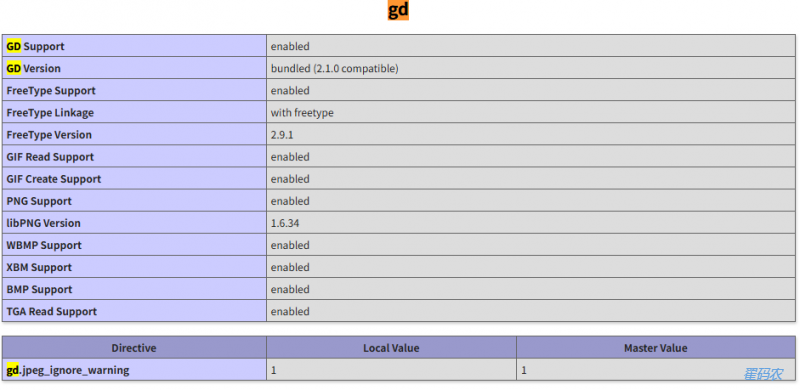
补装jpeg支持
bash
cd /php_source/ext/gd
phpize
./configure --with-jpeg --with-freetype --with-png
进入php源码gd目录,编译却一直报错:
txt
./configure: line 4124: ` PKG_CHECK_MODULES(ZLIB, zlib)怎么有多个phpize?
查看所有可用的phpize:
bash
find /usr -name "phpize*" -type f 2>/dev/null发现有多个phpize:
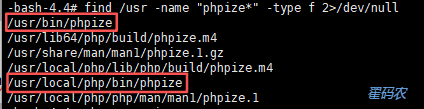
前面执行的phpize命令,显示如下:
txt
Configuring for:
PHP Api Version:         20170718
Zend Module Api No:      20170718
Zend Extension Api No:   320170718
跟phpinfo展示的版本号不一致:
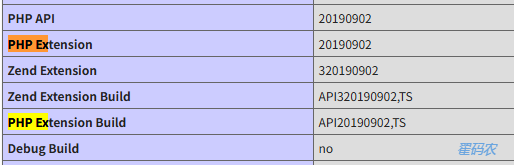
但当我执行如下phpize时(记得phpize --clean清除历史记录):
bash
/usr/local/php/bin/phpize结果显示就与上图一致了:
txt
Configuring for:
PHP Api Version:         20190902
Zend Module Api No:      20190902
Zend Extension Api No:   320190902
再进行如下编译:
bash
./configure --with-jpeg --with-freetype
make && make install
就成功了:
txt
Libraries have been installed in:
   /opt/software/php-7.4.8/ext/gd/modules

If you ever happen to want to link against installed libraries
in a given directory, LIBDIR, you must either use libtool, and
specify the full pathname of the library, or use the `-LLIBDIR'
flag during linking and do at least one of the following:
   - add LIBDIR to the `LD_LIBRARY_PATH' environment variable
     during execution
   - add LIBDIR to the `LD_RUN_PATH' environment variable
     during linking
   - use the `-Wl,--rpath -Wl,LIBDIR' linker flag
   - have your system administrator add LIBDIR to `/etc/ld.so.conf'

See any operating system documentation about shared libraries for
more information, such as the ld(1) and ld.so(8) manual pages.
----------------------------------------------------------------------

Build complete.
Don't forget to run 'make test'.

Installing shared extensions:     /usr/lib64/php/modules/
Installing header files:          /usr/include/php/
gd JPEG安装失败
通过如下运行php代码的命令查看gd信息:
bash
php -r "print_r(gd_info());"执行结果如下:
txt
Array
(
    [GD Version] => bundled (2.1.0 compatible)
    [FreeType Support] => 1
    [FreeType Linkage] => with freetype
    [GIF Read Support] => 1
    [GIF Create Support] => 1
    [JPEG Support] =>
    [PNG Support] => 1
    [WBMP Support] => 1
    [XPM Support] =>
    [XBM Support] => 1
    [WebP Support] =>
    [BMP Support] => 1
    [TGA Read Support] => 1
    [JIS-mapped Japanese Font Support] =>
)
看来JPEG支持还是没安装成功。
最终解决
最终正确编译命令如下:
bash
/usr/local/php/bin/phpize./configure --with-php-config=/usr/local/php/bin/php-config --with-jpeg --with-freetype --with-webp --with-xpm
前面尝试过程中,到最后重启php-fpm时,总是失败,报各种错误:
- undefined symbol: gdImageCreateFromWebp
- undefined symbol: gdImageCreateFromXpm
- undefined symbol: executor_globals
分别把Webp和Xpm加上后,最后一个错误估计就是没指定php-config导致默认用的php-config版本不对。
编译成功后,显示如下:
txt
Libraries have been installed in:
   /opt/software/php-7.4.8/ext/gd/modules

If you ever happen to want to link against installed libraries
in a given directory, LIBDIR, you must either use libtool, and
specify the full pathname of the library, or use the `-LLIBDIR'
flag during linking and do at least one of the following:
   - add LIBDIR to the `LD_LIBRARY_PATH' environment variable
     during execution
   - add LIBDIR to the `LD_RUN_PATH' environment variable
     during linking
   - use the `-Wl,--rpath -Wl,LIBDIR' linker flag
   - have your system administrator add LIBDIR to `/etc/ld.so.conf'

See any operating system documentation about shared libraries for
more information, such as the ld(1) and ld.so(8) manual pages.
----------------------------------------------------------------------

Build complete.
Don't forget to run 'make test'.

Installing shared extensions:     /usr/local/php/lib/php/extensions/no-debug-zts-20190902/
Installing header files:          /usr/local/php/include/php/
和上一次执行的结果,不同之处就是:Installing shared extensions后面目录不一样。
对照phpinfo里的extension_dir参数:
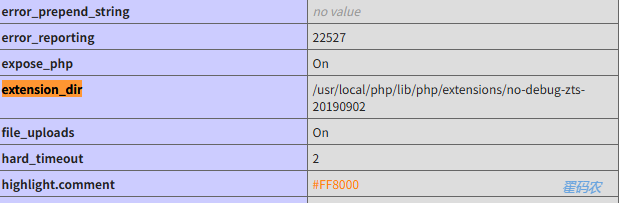
可知:
编译正确时,扩展so文件会自动在phpinfo里展示的extension_dir里,无须人工拷贝
目录不一致,就说明phpize或php-config版本信息不对。
成功后的gd模块信息
txt
-bash-4.4# php -r "print_r(gd_info());"
Array
(
    [GD Version] => bundled (2.1.0 compatible)
    [FreeType Support] => 1
    [FreeType Linkage] => with freetype
    [GIF Read Support] => 1
    [GIF Create Support] => 1
    [JPEG Support] => 1
    [PNG Support] => 1
    [WBMP Support] => 1
    [XPM Support] => 1
    [XBM Support] => 1
    [WebP Support] => 1
    [BMP Support] => 1
    [TGA Read Support] => 1
    [JIS-mapped Japanese Font Support] =>
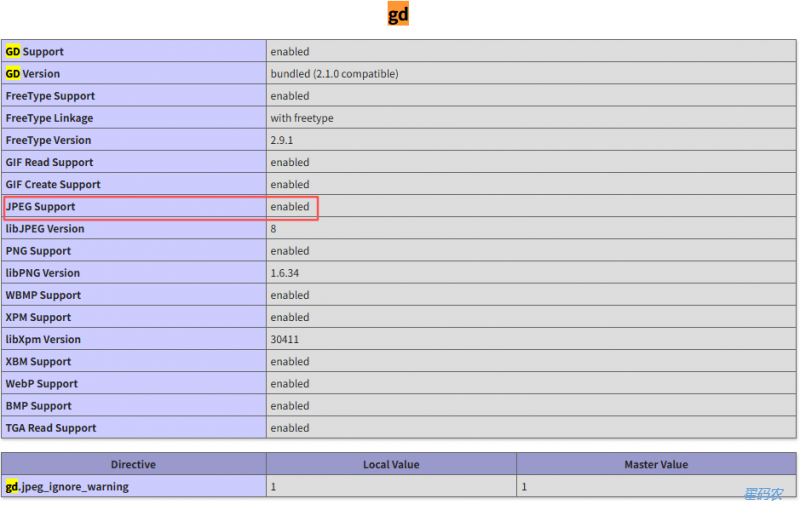
)
上一篇:php date函数获取上个月开始时间的注意事项(2025-07-31 12:21:37)
下一篇:犬夜叉片尾曲《深い森》完整版歌词(含平假名标注)(2026-04-11 20:52:16)
我要评论
评论列表